Verify your audit log
Tellus keeps your audit log in a hash chain and signs checkpoints of it with a key that never leaves its vault. This guide is for your auditor or security officer. It shows how to check, on your own computer and without trusting Tellus, that the log you exported is complete and unaltered.
Do this
Five steps. You do not need to know anything about computers, and nothing is sent anywhere — the program only reads the files on your own machine.
Get the export from Tellus
Sign in to Tellus. Click your company name, choose Company settings, then Tamper check in the list on the left. Click Export. A file downloads to your Downloads folder, named something like tellus-audit-integrity-….zip.
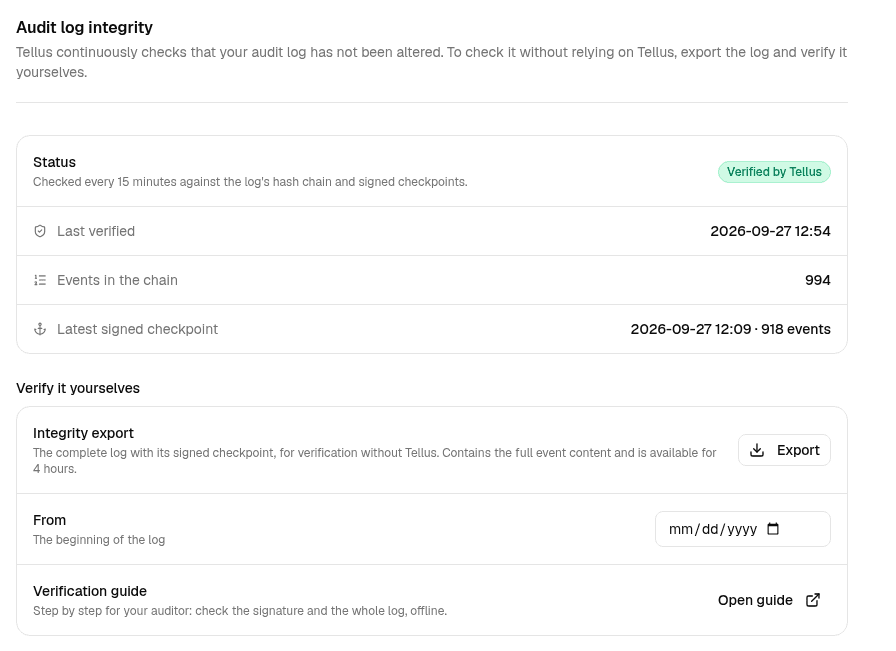
No Tamper check page? Then your account does not have permission to export. Your company owner can grant it.
Download the program for your computer
Pick the line that matches your computer. You get a zip file. Unpack it — it does not matter where the export from step 1 sits, you will drag it into the program's window.
- WindowsDownload (32.1 MB)
SHA-256 ac26f4ba5cdcf2ce181531396e903b4ded12ec0a63203a556db9aa7974116135
- Mac with Apple silicon (M1–M4)Download (30 MB)
SHA-256 15ddc1c011c9a8821fbc299c5a11d575878b3f39a2a2261042227afea3e8955e
- Mac with an Intel processorDownload (32 MB)
SHA-256 1e56e33b680e030a92c1c87b86ca5b24531464d626b3d5d2cef2427c4c6aa7ba
- LinuxDownload (32.1 MB)
SHA-256 a49e566e543eadc180d7e0b715ce603825508dbfffb2991f76c40da877b098c0
Not sure which line? An ordinary PC is Windows. On a Mac: click the Apple symbol at the top left and choose About This Mac. If it says Apple M1, M2, M3 or M4, take Apple silicon; if it says Intel, take Intel.
The zip holds the program, the Tellus public key (key.pem) and a short note. The key is what checks the Tellus signature. It can check signatures, never make them, so it is safe to pass around.
To be sure the file you got is the one we built, compare the output of this command with the SHA-256 line above.
Windows:  certutil -hashfile tellus-audit-verify-windows.zip SHA256
macOS:    shasum -a 256 tellus-audit-verify-macos-apple-silicon.zip
Linux:    sha256sum tellus-audit-verify-linux.zip
Run the program
Windows: double-click tellus-audit-verify.exe. A black window opens and asks for the export file. Drag the file into the window and press Enter.
Mac: right-click tellus-audit-verify.command and choose Open. A window opens and asks for the export file. Drag the file into the window and press Enter.
The first time, macOS says the program is from an unidentified developer. That is expected: we do not have Apple sign it, because a tool meant to audit us should not need anyone else's approval to run. Right-click and choose Open, and macOS offers to open it anyway.
Linux: open a terminal in the folder and run the command below with your export file's name.
./tellus-audit-verify <your-export>.zip key.pem
The program does everything on your computer. It needs no internet and sends nothing to Tellus. When it finishes it also saves the answer as a text file next to the export, to keep on file.
Read the answer
The program answers in your own language first — the language travels with the export, so there is nothing to set. The technical report follows, always in English: it is the exact text our two independent verifiers must print identically, which is why it is not translated.
This is what it looks like when everything holds:
The log is unaltered.
1015 events, checked against a checkpoint Tellus signed 2026-09-27 12:09 UTC.
The checkpoint's signature matches the key you supplied.

The technical report follows.

  [PASS] 0 Format
  [PASS] 1 Signature
  [PASS] 2 Linkage
  [PASS] 3 Recomputation
  [PASS] 4 Anchor binding
  [ -- ] 5 Continuity
         nothing to compare with yet: this is the first export of this chain this program has verified

VERIFIED - the events in this export are the history behind the anchor.- VERIFIED: the log is unaltered. Every event links to the one before it, and the chain ends exactly where Tellus signed it.
- CONSISTENT, NOT ANCHORED: the log holds together, but no signed checkpoint covers it yet. This is normal shortly after an event is recorded. Export again in an hour.
- NOT VERIFIED: something does not add up. Download the export again first — an interrupted download gives the same answer. If it persists, keep the files exactly as you received them and contact Tellus.
Keep the folder — the program remembers for you
After each check the program writes down the checkpoint it just verified, in a small file beside itself (tellus-checkpoints-seen.json). The next time you check an export it holds the new log against everything you have already seen.
This is the strongest check there is, and the one you would otherwise never get round to. A log rewritten in full and re-anchored agrees with itself perfectly — the only person who can catch it is you, because you remember what the log looked like last time. That is exactly why the file lives on your computer and not on ours.
The second time, the line reads:
  [PASS] 0 Format
  [PASS] 1 Signature
  [PASS] 2 Linkage
  [PASS] 3 Recomputation
  [PASS] 4 Anchor binding
  [PASS] 5 Continuity
         agrees with 2 checkpoint(s) this program verified before, the oldest taken 2026-09-27T11:09:29.9443100Z

VERIFIED - the events in this export are the history behind the anchor.
What this proves — and what it does not
- That every event in the export is exactly the history behind a checkpoint Tellus signed: nothing was altered, removed, inserted or reordered up to that checkpoint, not even by someone in full control of the Tellus database.
- Events recorded after the latest checkpoint link and recompute, but no signature covers them yet. Checkpoints are taken every hour, so a later export covers them.
- It proves what the log contains, not what it leaves out. An action that was never recorded cannot be verified, so a missing event does not prove that something did not happen. In particular, not every read is recorded.
- You verify the exported copy, not the Tellus database. Keep the files: a checkpoint you saved earlier can later be used to check a newer export.
- Events recorded before the hash chain was introduced belong to no chain and are not in the export. The manifest states how many there are (unchainedEventCount).
If you would rather do each step yourself
The rest of this page is the same checks, one at a time, with tools you can read before you run them. It is the route for an auditor who wants to see exactly what is checked — and for anyone who wants the step that establishes trust to run on openssl rather than on code of ours.
What you need
- The integrity export. In Tellus: Company settings, Tamper check, Export. The company owner can export; anyone else needs the permission audit: integrity export.
- The verification key published on this site.
- openssl and jq for the signature, and python3 for the log. Nothing connects to the network.
1. Export the log
Download the integrity export and unpack it. It holds events.ndjson (every event, in order, with its hashes), anchor.json (the latest signed checkpoint), manifest.json (what the export contains) and README.txt (these steps in short, and where the tools are published). The tools are deliberately not inside the file: a verifier shipped by the system it checks proves nothing. Keep anchor.json — you can use it to check a later export.
unzip tellus-audit-integrity-<chain>-<time>.zip
2. Check the checkpoint’s signature
This is the step that establishes trust, so it uses nothing from Tellus except the public key. Download the key for the version the checkpoint names, compare its fingerprint with the one listed on this site, and run verify-anchor.sh.
openssl pkey -pubin -in key.pem -outform DER | openssl dgst -sha256
bash verify-anchor.sh anchor.json key.pem
When the signature holds, it ends with:
VERIFIED — this checkpoint was signed by Tellus and has not been altered since.
If it does not, the tool lists the likely causes in order: the wrong key version, a file that changed in transit, and only then a checkpoint that is not authentic.
3. Check the log against the checkpoint
Run verify_audit.py on the zip file. It checks that every event links to the one before it from the start of the chain, that every hash recomputes from its event’s content, and that the chain holds exactly the head the checkpoint signed. Tellus also has a compiled version of the same checks; the two are tested to print exactly the same thing for every file.
python3 verify_audit.py tellus-audit-integrity-<chain>-<time>.zip
A verified export looks like this:
  [PASS] 0 Format
  [ -- ] 1 Signature
         no key given: run again with the key published on the Tellus trust portal, or check the signature yourself with verify-anchor.sh
  [PASS] 2 Linkage
  [PASS] 3 Recomputation
  [PASS] 4 Anchor binding
  [ -- ] 5 Continuity
         nothing to compare with yet: this is the first export of this chain this program has verified

VERIFIED - the events in this export are the history behind the anchor.
When a check fails, the output names the check, the event and what it means. Here one event was altered after export; everything before it still holds:
  [ -- ] 0 Format
         held for the first 56 events; not checked past ingestSeq 57
  [PASS] 1 Signature
  [ -- ] 2 Linkage
         held for the first 56 events; not checked past ingestSeq 57
  [FAIL] 3 Recomputation
         at ingestSeq 57, event 85e848bf-a22b-4201-9d52-3e2f64ff51d9
         eventHash does not recompute from rawEvent: the event's content was changed
  [ -- ] 4 Anchor binding
         not completed: verification stops at the first failure
  [ -- ] 5 Continuity
         not completed: verification stops at the first failure

NOT VERIFIED - recomputation failed.
The strongest form of the check is to bind a new export to a checkpoint you saved yourself, from an earlier export. A checkpoint you already held cannot have been made to fit the new file:
python3 verify_audit.py <export>.zip --anchor anchor-saved-earlier.json
Long logs: one stretch at a time
A log with tens of millions of events is not practical to export or verify in one piece. An export can therefore cover one stretch between two signed checkpoints. It then also holds start-anchor.json, the checkpoint the stretch continues from, and the manifest states the ingestSeq it continues after.
- Check the signature of BOTH checkpoints in step 2, the one it continues from and the one it ends at. The stretch rests on both.
- A stretch cannot quietly hide events before it: the closing checkpoint counted every event from the beginning of the log, so the number of events before the stretch plus the events in it must equal that count. The verifier checks this and says so if it does not add up.
- Verify stretch after stretch, and keep the last checkpoint of each: it is the starting point of the next one.
What each outcome means
- VERIFIED (exit status 0): the events are the history the checkpoint signed. Together with a verified signature in step 2, the log up to the checkpoint has not been altered.
- CONSISTENT, NOT ANCHORED (exit status 3): the chain holds together, but no signed checkpoint covers it yet. Export again later, or bind it to a checkpoint you already hold with --anchor.
- Format failed (exit status 1): the file is incomplete or damaged. Download it again before drawing any conclusion.
- Linkage failed: an event is missing, extra or out of place at the position shown.
- Recomputation failed: the content of the event at the position shown no longer matches its hash.
- Anchor binding failed: the history in the export is not the history the checkpoint signed.
- Continuity failed (exit status 1): the export contradicts a checkpoint your program has already verified. The file itself is sound — it is the history that does not add up. Ask Tellus first whether a restore from backup has been declared for your log; a restore breaks the chain and is recorded by Tellus as a signed declaration.
If something does not verify
A failure is not automatically an attack. First download the export again, and check the key version and its fingerprint. Then ask Tellus whether a restore from backup was declared for your log: a restore also breaks the chain, and Tellus records every restore as a signed declaration. If it still fails, keep every file exactly as you received it and contact Tellus. Do not edit, re-save or repack the files.
The tools
Both are plain text, so you can read them before you run them. Check the SHA-256 of each file after downloading.
- verify-anchor.sh: step 2 (bash, openssl, jq)verify-anchor.sh
SHA-256 85acf9248725e7a49415512cd812e0dee3e89d7f4bbcfe740ee6ef8569f1d4ad
- verify_audit.py: step 3 (python3, standard library only)verify_audit.py
SHA-256 8329906c1654937e2b38842d32f67ae47a487b79cfec09a993301380dd2a4704
- tellus-audit-verify: the same checks as a compiled program, and the reference implementation. It is what step 2 above downloads; its source is the code the audit service verifies with itself.
sha256sum verify_audit.py verify-anchor.sh
Technical specification
For anyone who wants to reimplement the checks. This section is normative: an implementation that follows it reproduces the Tellus hashes byte for byte.
Each event’s hash covers the previous event’s hash and the canonical form of the event. rawEvent is carried as a JSON string: decode it, then canonicalize.
eventHash = SHA-256( prevHash || UTF-8( canonical( rawEvent ) ) )
prevHash(first event) = 32 × 0x00
Canonical form: object keys sorted by UTF-16 code unit, duplicates kept in their order; arrays in order; no whitespace; numbers exactly as written; true, false and null as they are. Strings are escaped as follows:
0x20–0x7E as itself, except  "  &  '  +  <  >  `
" → \u0022   & → \u0026   ' → \u0027   + → \u002B   < → \u003C   > → \u003E   ` → \u0060
\ → \\   and   \b \t \n \f \r
everything else → \uXXXX (upper-case hex); beyond U+FFFF → two escaped UTF-16 surrogates
A checkpoint signs its signedPayload: five fields, each ended by the byte 0x1F. The signature is ECDSA P-256 over SHA-256, DER-encoded.
chainKey 0x1F headEventHash 0x1F headIngestSeq 0x1F eventCount 0x1F yyyy-MM-ddTHH:mm:ss.fffffffZ 0x1F
signature = hex( "vault:vN:" + base64( ECDSA-P256-SHA256-DER( signedPayload ) ) )
Binding: the event at the checkpoint’s ingestSeq must carry the checkpoint’s head hash, and exactly the checkpoint’s event count must lead up to it, that event included.